Facegroup organizes your entire photo library — grouping faces, recognizing objects and scenes, reading text in images, and making it all instantly searchable. Every bit of it runs on your own machine.
A quick look at how Facegroup brings a photo library to life — entirely on your own machine.
All the organization of a modern cloud photo service, with none of the cloud.
Automatically finds and groups the same person across your whole library. Name them once, find them forever.
Recognizes what's in every photo — beaches, dogs, birthday cake, mountains — so you can search by content, not filenames.
Reads text inside your photos — signs, receipts, screenshots — and makes it fully searchable.
Index photos from local folders, your Apple Photos library, and more. Your originals stay exactly where they are.
One search box across faces, labels, text, dates, albums, and events. Find any photo in seconds.
Every model runs on your computer. Nothing is uploaded, no account is needed, and it all works with the internet off.
Three of the things people use Facegroup for every day.
Facegroup detects every face in your library and groups the same person together — across years, cameras, and sources. Give a group a name once and every photo of them is a click away.

One box searches across faces, objects, scenes, text found in images, dates, albums, and events. Type "beach 2019" or "whiteboard notes" and get exactly what you meant.

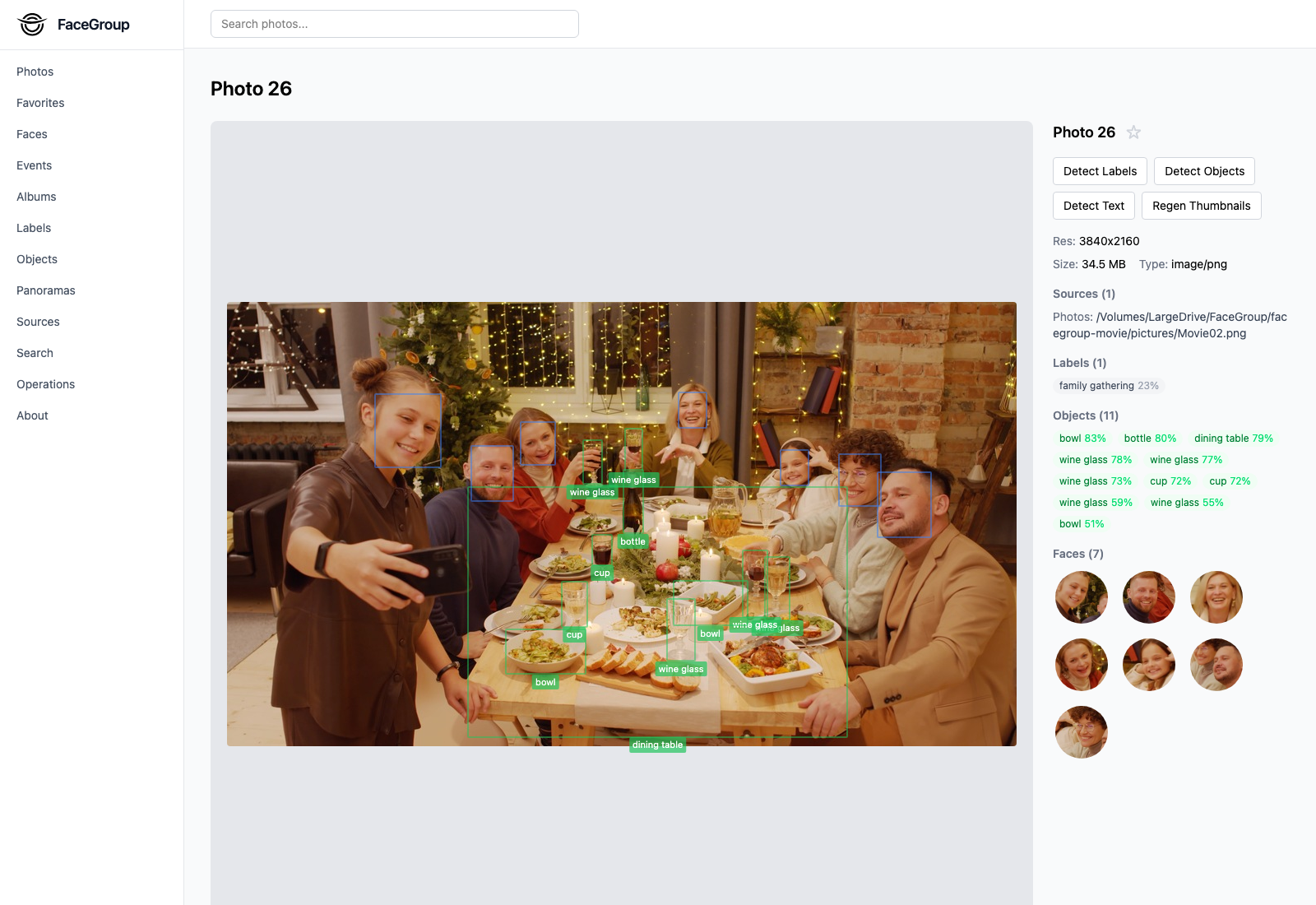
On-device models recognize objects and scenes and tag every photo, so you can browse by what's actually pictured — not by filename or folder. Open any photo to see detected faces, objects, and text laid right over the image.

Other photo apps send your most personal images to someone else's servers for "AI features." Facegroup runs the same kind of AI — face recognition, object detection, OCR — entirely on your own hardware. There is no cloud to breach, no account to leak, and no company quietly training on your family photos.
Own the version you buy forever, or subscribe to get every future update as it ships.
No. Facegroup processes everything on your own computer. Your photos, faces, and metadata never touch a server, and the app works with no internet connection. The only time it goes online is a brief license check and an optional update check.
Lifetime ($99) is a one-time purchase — you own the version you buy and can keep using it forever, with no recurring charges. Subscription ($50/year or $5/month) always gives you the latest version with every new feature and model update as it ships, for as long as you're subscribed. If you cancel the subscription, it stops — to own a copy permanently, choose Lifetime.
Yes — both Lifetime and Subscription include support. With a Lifetime license, support covers the version you purchased. With a Subscription, support is ongoing and covers every update for as long as you're subscribed. Just email support@facegroup.io — we typically reply within two business days.
Facegroup currently runs on macOS. It requires ImageMagick to be installed for full format support (the app will guide you if it's missing). Windows support is planned.
Up to 3 of your own devices per license. You can deactivate a device at any time to free up a slot if you switch machines.
Yes — if Facegroup isn't for you, request a refund within 14 days of purchase.
Your original photos stay exactly where they already live (local folders, your Apple Photos library, etc.). Facegroup only stores thumbnails and a local searchable index in your user Application Support folder.